
Focus mode
Block Instagram at prayer time
The azan goes off, you pick up your phone "for a second", and Asr is suddenly late. SalahMate can lock Instagram, TikTok or any app you choose at each prayer time, until you've prayed and logged it.
Why block apps during salah?
Feeds are designed to keep you scrolling, and prayer time is often exactly when you reach for your phone: a break at work, the end of a lecture, just home. Willpower at that moment is weakest. Taking the decision away in advance is easier than winning it every time.
How to set it up
- Install SalahMate from Google Play and finish setup, so it knows your prayer times.
- Turn on app blocking in Settings. It's off until you turn it on.
- Allow the Accessibility service when asked. This is how Android lets SalahMate notice that a blocked app has opened.
- Choose the apps. Instagram, TikTok, YouTube, X, Snapchat, games — anything installed on your phone.
- Pick the timing. On the free plan, blocking starts 5 minutes before each prayer. With Pro you choose when it starts and ends.
What happens when an app is blocked
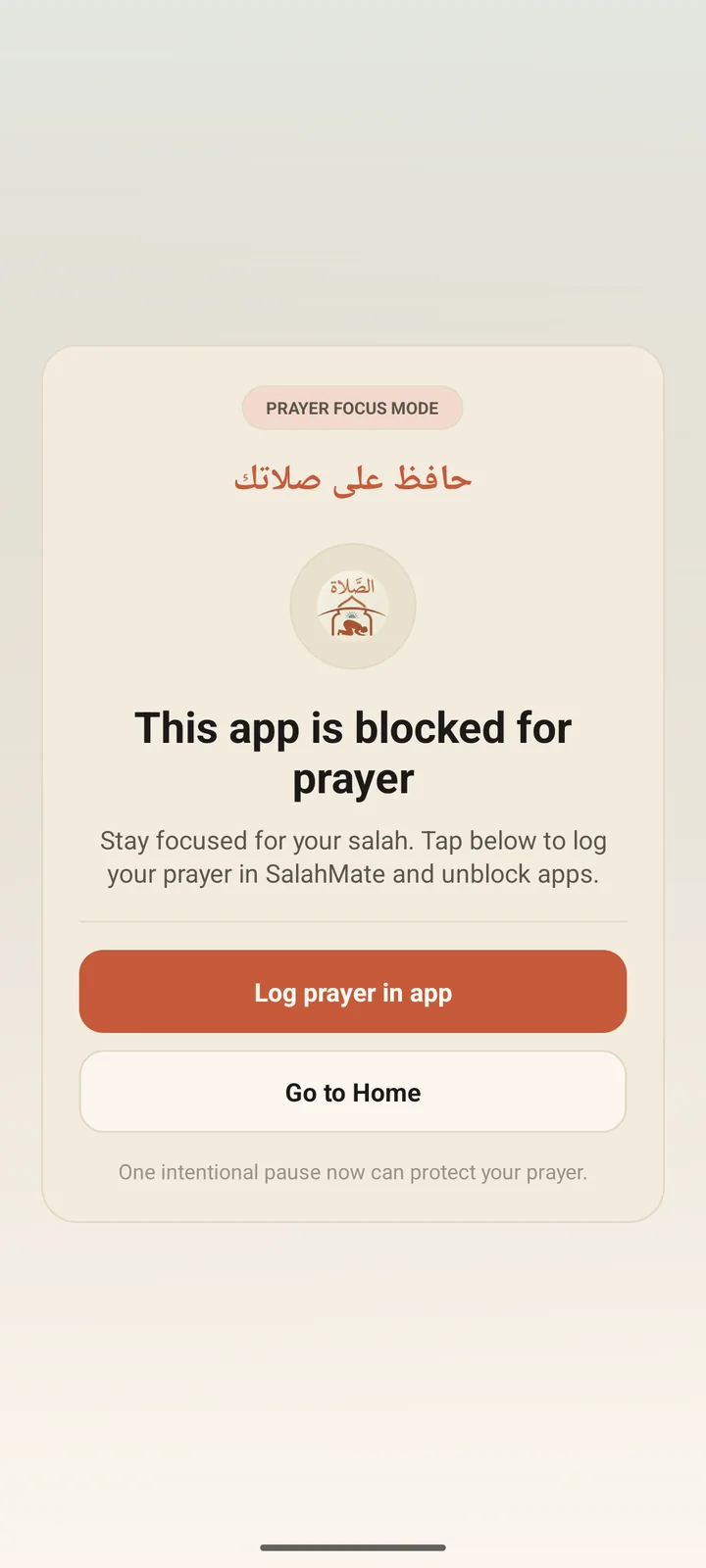
Open a blocked app during a prayer window and a calm overlay appears instead: "Instagram is blocked for prayer". From there you can:
- Log prayer in app — opens SalahMate. Once you log the prayer, your apps unlock.
- Go to Home — closes the app and takes you back to your home screen.
Prayers you log also count toward your streak and journal, so you can see whether the blocking is actually helping.
About the Accessibility permission
Accessibility is a powerful Android permission, so it's fair to ask why it's needed. Android doesn't let apps see which app is on screen any other way. SalahMate uses it only to detect when a blocked app opens during a prayer window and show the overlay. It's optional and only requested if you turn on app blocking. Details are in our privacy policy.
Other ways to block apps at prayer time
- Android Digital Wellbeing. Focus mode can pause chosen apps on a schedule, for free. But the schedule is fixed clock times, so you'd adjust it as prayer times shift, and it's easy to switch off.
- iPhone Screen Time. Downtime and App Limits work the same way: useful, but not tied to prayer times. SalahMate isn't on iPhone yet.
- Deleting the app. The most effective option, if you're ready for it.
Want to wake up for Fajr too? See the Smart Fajr alarm, or compare SalahMate with other prayer apps.
Questions
Is app blocking free?
Yes. On the free plan blocking starts 5 minutes before each prayer. SalahMate Pro (USD $4.99 a month or $34.99 a year) lets you choose when blocking starts and ends.
Which apps can I block?
Any app installed on your phone. You pick them from a list in Settings.
Can I turn it off?
Yes, any time in Settings. You can also remove SalahMate's Accessibility access in Android settings.
Does it work on iPhone?
Not yet. SalahMate is Android only today. On iPhone, Screen Time's Downtime is the closest built-in option.
Let Asr win this time
Install SalahMate, choose the apps that pull you in, and let prayer come first.
Get it on Google Play